Titan Pro Fiber Laser Pulse Width Update Issues
Preface
1 Symptoms
The following two parameter update issues may occur during fiber laser processing.
Issue | Parameters not updated between consecutive fiber layers | Intermittent pulse width reception failure |
Details | When consecutive layers all use the fiber laser, only the first layer triggers parameter transmission. Later pulse width settings are not sent, so the source may retain the previous layer’s setting. | The source sometimes does not receive the pulse width setting when fiber processing starts. Updating the per-layer parameter logic alone does not address the red-beam-enable timing issue. |
Cause | Fiber Module V1.9 does not update parameters at the start of each consecutive fiber layer. | The source covered by this guide requires red-beam enable before receiving pulse width parameters. The current sequence does not ensure this order. |
2 Causes
Cause A: V1.9 does not update parameters at the start of every consecutive fiber layer
Fiber Module firmware V1.9 sends parameters when the system enters fiber operation. If subsequent layers also use the fiber laser and the operating state does not change, another parameter update is not triggered. V2.0 is designed to use the laser-enable trigger at the start of each fiber layer to send that layer’s parameters.
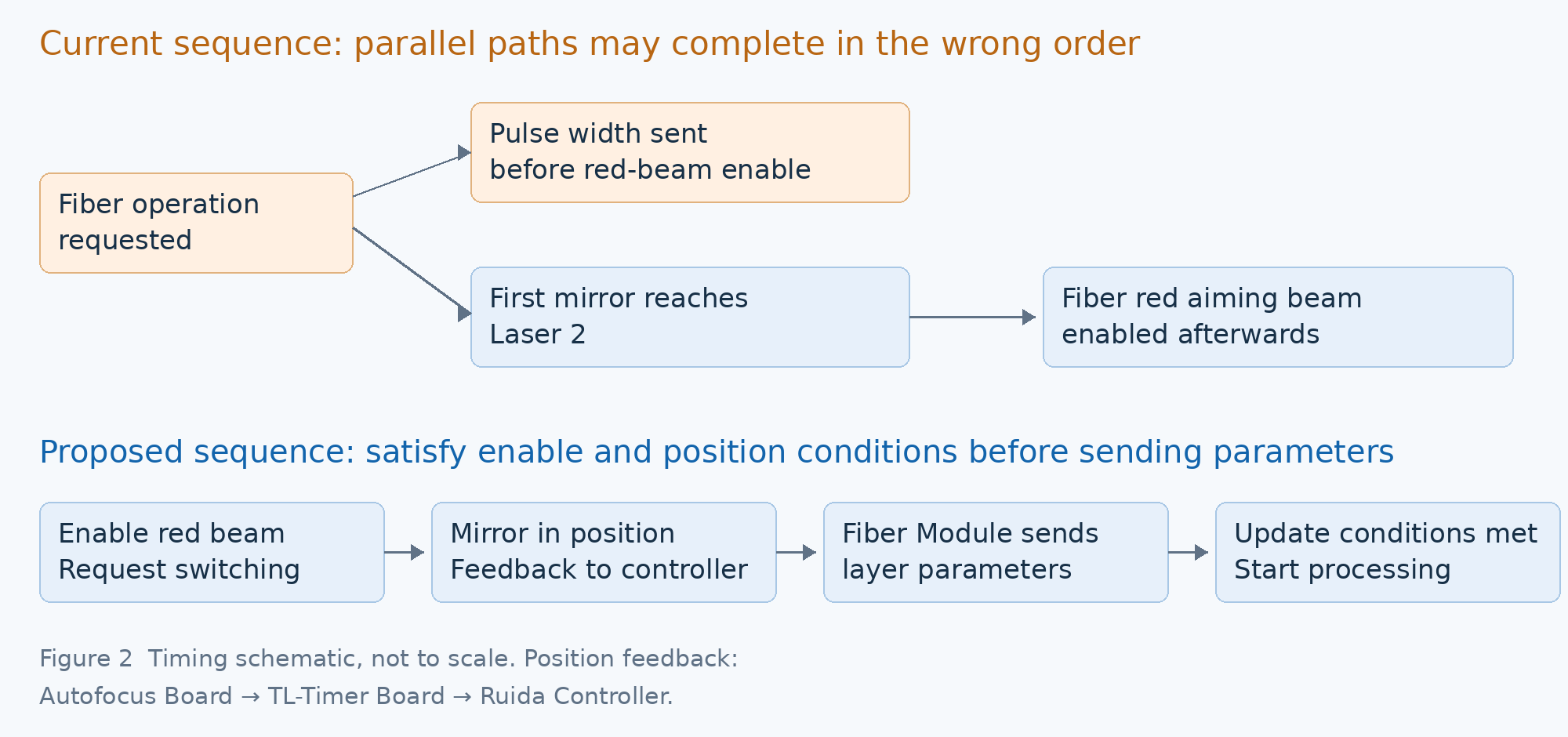
Note: Fiber Module V2.0 provides parameter updates for each layer. “Expected” in Figure 1 indicates the target behavior to verify after the update. The lower part of Figure 2 shows the proposed timing changes for the Ruida Controller and TL-Timer Board. Contact Technical Support to confirm the applicable firmware versions and release status.
Cause B: Red aiming beam enable occurs after pulse width transmission
The fiber laser source covered by this guide requires the red aiming beam to be enabled before it can receive pulse width parameters. Fiber Isolation Board V1.4 adds red-beam-enable terminals so that the fiber red aiming beam can be switched off when fiber operation is inactive. However, the current TL-Timer Board and Ruida Controller logic does not ensure that red-beam enable becomes active before parameter transmission. As a result, the source may not receive the pulse width setting for the current fiber layer.
In the current sequence, parameter transmission and optical path switching run in parallel. The fiber red aiming beam is enabled only after the first mirror has switched to the Laser 2 optical path, while the parameters may already have been sent.
The original analysis records approximately 2 seconds for switching from the Laser 1 optical path. Even if the first mirror is already at Laser 2, the two control paths may complete in a different order, causing intermittent failures.
3 Solutions
Step 1 Update the Fiber Module firmware
Update Fiber Modules running V1.9 to V2.0 to address missing parameter updates between consecutive fiber layers. Use the firmware package and procedure applicable to the machine configuration.
Fiber Module firmware update guide: How to Upgrade the Fiber Module Firmware
Step 2 Select the action for the Fiber Isolation Board version
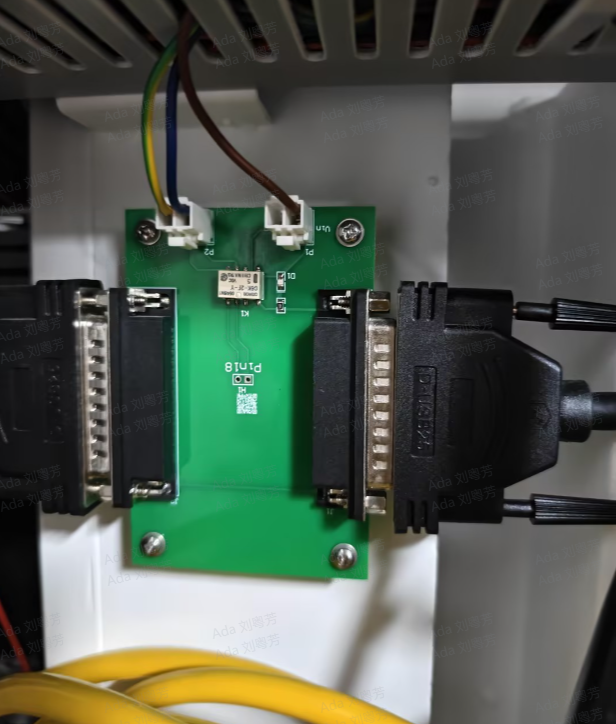
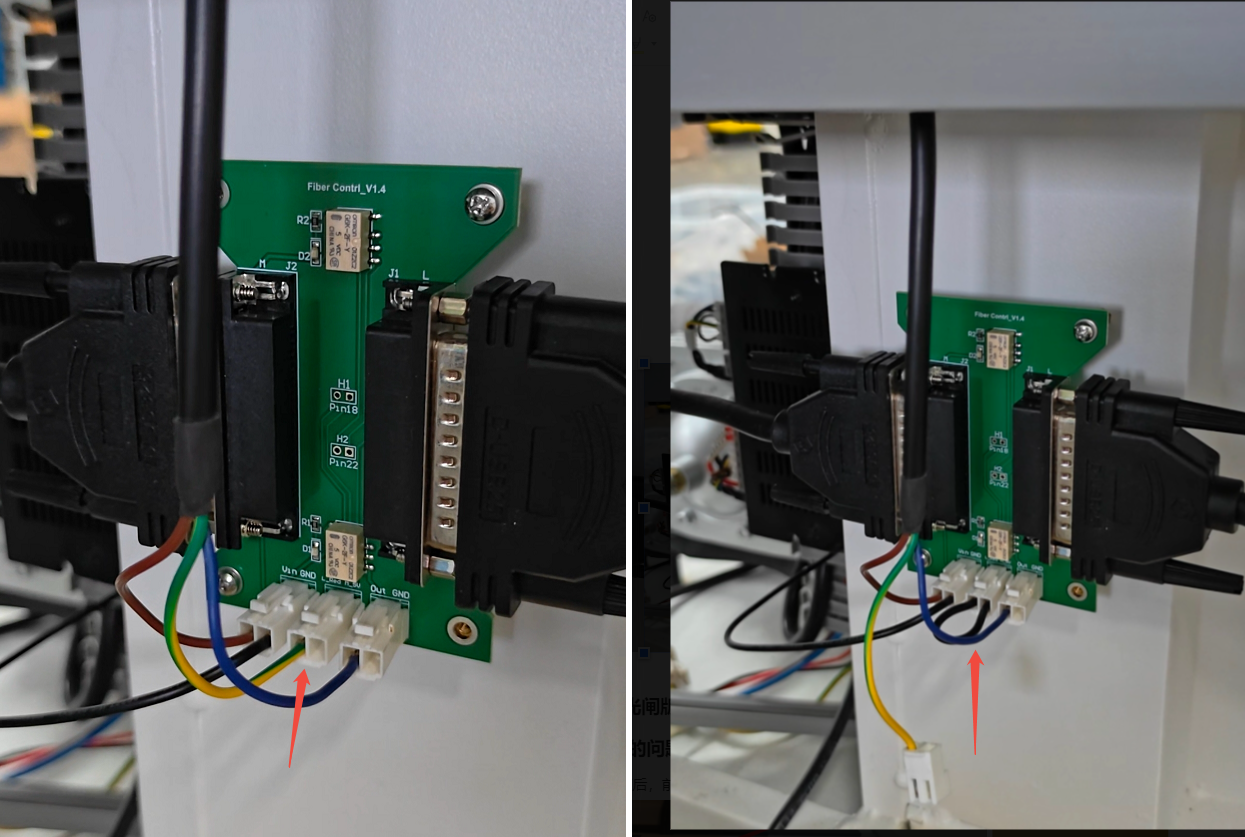
V1.0 requires no action for red-beam enable. For V1.4, either jumper the designated red-beam-enable terminals or update the Ruida Controller and TL-Timer Board firmware together. Neither option replaces the Fiber Module firmware update in Step 1.
Configuration | Action | Reference |
First 10 prototypes | This version has no red-beam-enable terminals. The fiber red aiming beam is continuously enabled, so no action is required. |
|
Fiber Isolation Board V1.4 | Jumper the designated red-beam-enable terminals to keep the fiber red aiming beam enabled. |
|
Fiber Isolation Board V1.4 | Update the Ruida Controller and TL-Timer Board firmware together to enable the red aiming beam earlier and send parameters after the first mirror’s position confirmation. | Contact Technical Support for the applicable firmware versions and update procedure. |
Step 3 Check signal level settings on early prototypes
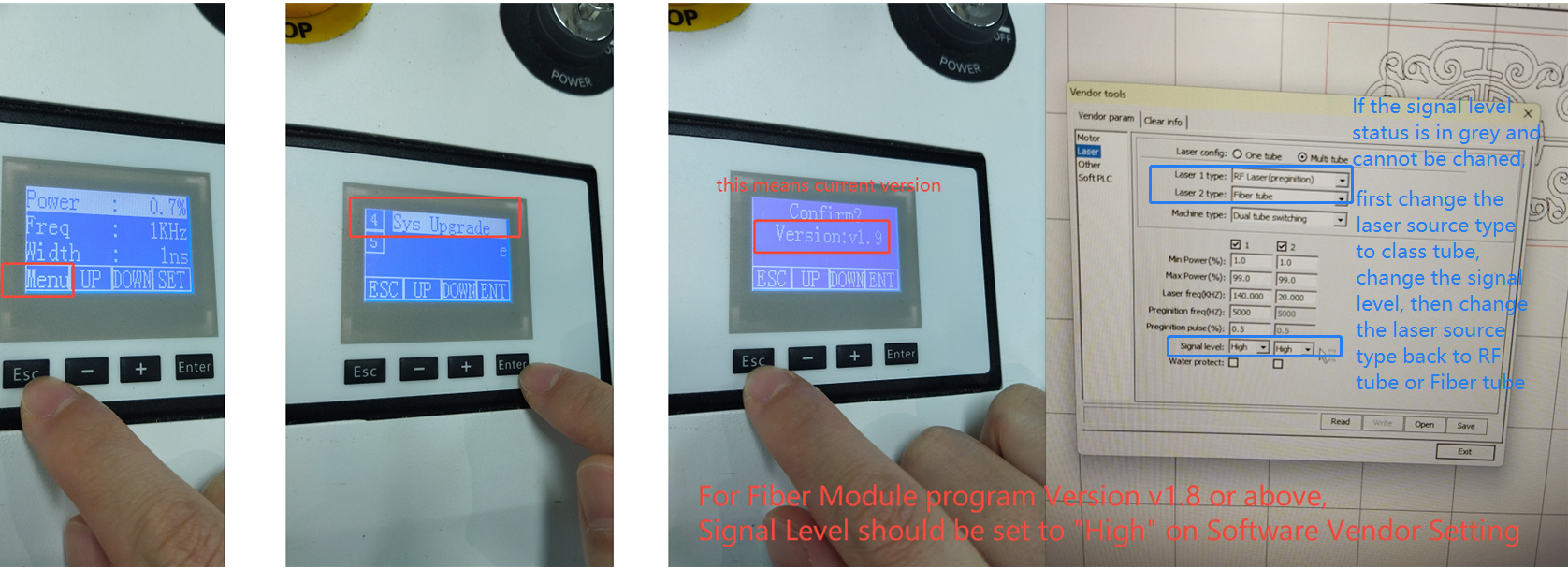
For any of the first 10 prototypes running Fiber Module firmware V1.4, change the corresponding Signal level setting from Low to High in the software Vendor Settings when updating to V2.0.
As indicated in the reference image, Fiber Module firmware V1.8 and later requires the corresponding Signal level setting to be High. Check this setting when updating from V1.4 to V2.0.
4 Verification
Create consecutive fiber layers with different pulse width settings. Confirm that the parameters update for every layer, and check frequency updates as well.
Test both switching from the Laser 1 optical path to fiber processing and consecutive processing with the mirror already at Laser 2. Check the first layer and subsequent layers.
Still need help?
For specific technical questions or help requests, please open a Ticket with picture or video, so our Support team can assist you ASAP.
For the information provided in the ticket, please refer to this link:
Help Tech Support Troubleshoot Faster
End.