LaserMaker 2.3.3 Update Details
Preface
LaserMaker 2.3.3 introduces targeted optimizations and fixes to enhance your laser processing workflow. This document outlines key updates designed to improve stability and user experience. Let’s dive into the details.
Download Channel
You can find LaserMaker 2.3.3 on our official website and download it for use.
1. New Features
1.1. Automatic Camera Calibration
The automatic calibration function has been added to speed up calibration for the top cover camera and open lid camera. With automatic calibration, manual calibration is no longer required, greatly boosting calibration efficiency. Since this feature relies on the movable camera, it is only available for Titan models at present.
1.2. Vendor Settings Interface Reset Confirmation
A confirmation prompt is added before resetting the Vendor Settings interface. It prevents accidental triggering of the reset button and avoids unintentional clearing of vendor parameters.
1.3. Automatic Calibration Log
Added an automatic calibration log function. The system records the execution time, camera parameters, calibration results, and exception information of each auto-calibration.
You can view the log files in the directory:
C:\Users\[Your Windows Username]\AppData\Local\LaserMaker\Resources
1.4. Support Original Color Display for Images
Added the original color tool, which supports original color display of images within the software, and the original color information of pictures can be fully retained for real-time preview.
2. Optimizations Features
2.1. Modification of scan offset upload logic
The Enable Bidirectional Calibration function is now forcibly enabled and cannot be manually switched off by users, ensuring consistent engraving precision.
2.2. Optimized Mark Point Machining Process
- Added a Refresh preview button to refresh the live camera feed manually, so users can update the view after repositioning workpieces for quicker visual inspection.
- Added Camera Move Speed parameter for adjusting camera motion speed during Mark positioning.
- Restructured the Mark group parameter panel. Array spacing and quantity are configured via Horizontal/Vertical Spacing and Groups, streamlining array Mark setup logic and improving usability.
For usage instructions and further information about this feature, please refer to the timestamp after 05:06 in this video.
https://www.youtube.com/watch?v=8Uoa4ULhwXo&t=3s
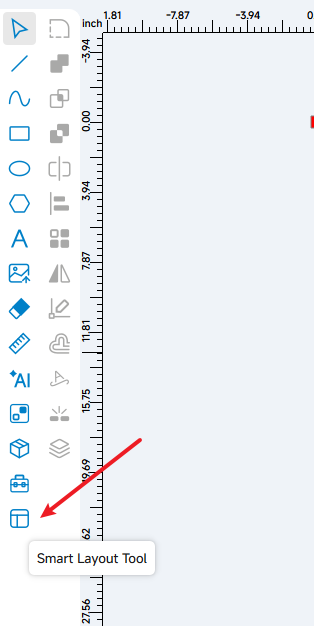
2.3. Optimized Smart Layout Tool Function
3. Repair Features
3.1. macOS USB Direct Connection: Garbled Camera Names
Fixed the issue of garbled camera device names when connecting via USB directly on macOS.
3.2. Unit Conversion Precision Loss (mm/s ⇄ inch/s)
Fixed precision loss when converting speed units between mm/s and inch/s.
3.3. macOS Movable Camera Calibration: Calibration Page Crash
Fixed a crash on macOS when re-entering the Movable Camera calibration page after calibration was completed.
3.4. Ineffective 9-Grid Job Origin
Fixed the issue where the 9-grid Job Origin selection failed to take effect under the condition that Start From is set to User Origin.
3.5. Offline Custom Materials Lost on Restart
Fixed the issue that newly added custom materials get lost after a software restart when the device is offline.
Still need help?
For specific technical questions or help requests, please open a Ticket with picture or video, so our Support team can assist you ASAP.
For the information provided in the ticket, please refer to this link:
Help Tech Support Troubleshoot Faster