Test the power of RF Tube

Test the power of RF Tube

Preface

This article is about how to use a power meter to check the power of an RF tube.

Tools required

1. Tools
Power Met
er, People *2

Quick Video


Specific inspection steps

1. Please open the door on the left side, find this small board, and press this button. This will allow us to open the door for out of the beam. Please be careful.

2. Find the Alignment function on the touch panel and unclick the Pulse time.


3. Set the power to 99%.
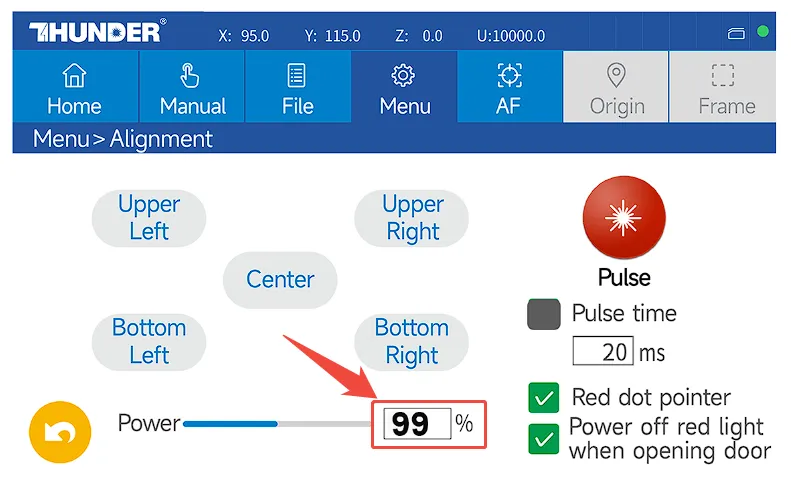
4. Put the power meter at the RF tube nozzle.


5. Press the switch of the power meter and keep pressing the Pulse button on the panel until you hear the beep sound from the power meter, and then release it. And check what the reading of the power meter is.


Still need help?

For specific technical questions or help requests, please open a Ticket with picture or video, so our Support team can assist you ASAP.

For the information provided in the ticket, please refer to this link:

Help Tech Support Troubleshoot Faster


End.


    • Related Articles

    • The RF tube won’t fire the beam?

      Problem Description: The RF tube won't fire the beam even the laser switch is on. Reasons: 1. The temperature of RF tube is too high. If the temperature of RF tube is too high, RF tubes won't emit beam. Solution: Please off the machine and wait 4-5 ...
    • LightBurn Material Test

      Preface We recommend using LightBurn's material testing feature before engraving or cutting new materials to determine the optimal parameter. At the same time, we have tested some common materials and the following are the recommended parameters for ...
    • How to Test Focus Distance on Titan and Titan Pro

      Preface This guide explains how to test and confirm the focus distance (focal length) on Titan Series machines. Test results can be saved to the USB drive supplied with the machine. You may perform the test using RDWorks, LaserMaker, or LightBurn ...
    • Parameters for RF Laser Tube

      Please see attached END
    • Lightburn Material Test for All RF Tubes

      Test with 3mm plywood, LightBurn software,Engraving(Fill) and Cutting(Line) modes, 30W, 55W RF tubes. Engraving(Fill) 30W 55W Cutting(Line) 30W cutting is coming 55W Note: If the circle does not close, it is caused by the minimum power setting being ...